

Connect Telegram
Create a Telegram bot and connect it so an agent answers whoever writes to it.
With a Telegram bot, your customers chat with your agent from Telegram. TukiAssistant sets up the bot’s webhook for you.
Steps
Create the bot with BotFather
In Telegram, open a chat with @BotFather and send /newbot.
Save the token
Choose a name and a username for the bot. BotFather replies with the bot token: a text like 123456789:AA.... Copy it.
Open Integrations
In TukiAssistant, open Integrations in the sidebar.
Choose Telegram
Under Add integration, click Telegram.
Fill in the bot details
Enter an Integration name and paste the token in Bot Token.
Choose the agent
In Agent, choose the agent that will answer.
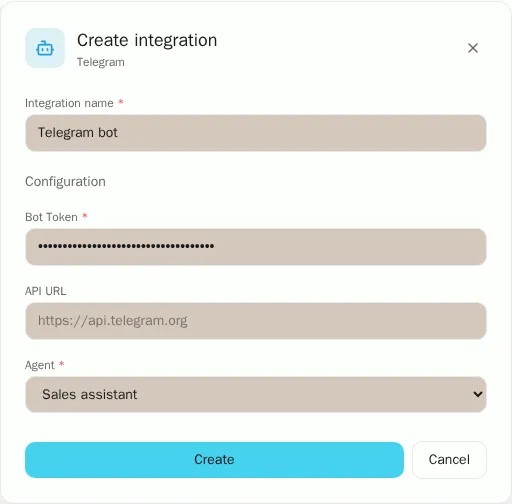
Create the integration
Click Create. TukiAssistant registers the webhook with Telegram.
Message your bot
Write to your bot from Telegram. The agent answers within a few seconds.